Before EHR software came into use, all patient records were just paper charts. A folder for each patient. Handwritten notes put in filing cabinets. You could only see a patient’s full history and details if you were standing in front of the right drawer at the right time.
That system had many problems that seem very obvious now. But back then, most practices didn’t really notice how much it was holding them back. Not until digital records came along and showed them what was really possible.
EHR software changed everything a lot. How patient information is stored. How it is accessed. How it is used. These days, a practice with a well-run EHR has a real advantage over practices that are still using paper or struggling with bad software.
But here’s the really important thing. Just having EHR software and actually using it well are two very different things. Let’s go deep into this.
What Is EHR Software?
EHR software is a complete digital system that stores all of a patient’s health information in one single place. This can be lab results, medications, medical histories, allergies, immunization records, treatment plans, clinical notes, and any referrals. Everything is fully organized and easy to find. Any authorized member of your care team can access it whenever they need it.
An EHR can easily follow the patient across many different providers and settings. A specialist can see what the main care doctor wrote down for them. A hospital can check the patient’s current medication list too. Everyone involved in the patient’s care is looking at the same complete information.
A study involving 42 district hospitals and 215 health centers found that district hospitals had full 100% EMR usage. However, only 33% of health centers had EMR systems available at all. That is a big access gap. And it explains all the gaps in outcomes too.
Why EHR Software Matters for Your Practice
Moving from paper to EHR is not just about going digital. It completely changes how care is delivered in your practice and how well the clinical work is recorded.
All patient information is there when you need it. A patient calls you with a question about their medication. You just pull up their record fast. A patient comes to you for a follow-up and cannot remember what was recommended to them last time. It’s all right there. You never have to search it.
All documentation is clear and organized. Handwriting errors are also gone because there’s no handwriting at all. Standardized note formats mean every single record follows the same structure. This means the note from two years ago looks just like the one from last Tuesday.
Clinical decision support makes care safer too. EHR systems that have alert features can flag any drug interactions before a prescription is sent. They can show missing immunizations. They can warn you if a patient’s allergy conflicts with something you’re ordering.
Care coordination gets better as well. When multiple providers in different settings can see the same complete record of the patient, the fragmentation that causes any medication errors and duplicate testing really goes down.
Billing accuracy improves too. When clinical notes are complete and correctly structured, coding is also more accurate. And accurate coding means clean claims that get paid the very first time.
Value of EHR Software in Modern Healthcare
EHR software does more than just store your patient records. It’s the foundation that makes modern healthcare work so well.
EHR software helps keep patients safe. It cuts down on medical errors too. It gives doctors the full picture they need to make better decisions for patients. It also saves time by reducing extra paperwork.
Verywell Health explains that EHRs help doctors give better care. They give a complete view of a patient’s health. They also help different providers work together more easily. WebMD also notes that electronic health records help patients get faster and safer care. They also make it simpler for patients to see their own health information.
When EHR software works well, the whole practice runs much better. Patients are safer. Providers save time too. The practice becomes more efficient and profitable. That’s why EHR software is the real backbone of modern healthcare.
Key Features of Modern EHR Systems
A fully functioning EHR must deliver several important features:
- Records demographic and clinical data across all service lines
- Documents referrals and tracks outcomes
- Tracks quality, performance, and compliance metrics
- Supports e-prescribing and lab orders
- Enables multidisciplinary treatment plans
- Provides mobile access, so providers can see records and complete documentation without being at the desktop for long
- Supports secure two-way messaging between providers and patients
- Offers clinical decision support tools that surface relevant alerts at the point of care
All these features work together as a complete clinical infrastructure. Any one of them in isolation is useful. But all of them integrated into a single platform that your whole team uses consistently is what makes EHR software genuinely the backbone of a modern medical practice.
Documentation and Templates That Save Time
Templates are one of the most powerful tools of an EHR system. They make documentation faster, keep notes consistent, and also save time. But most practices don’t use them enough.
A medical chart template keeps the whole patient record organized in the same format every time. History goes in one spot. Exam findings go in another. Assessment and plan too.
A patient notes template captures all the clinical details of every visit in a fully structured way. The history of present illness, review of systems, physical exam findings, assessment, and plan all have their own sections.
A nursing report sheet template helps nurses document patient status and care activities in a format that supports really smooth shift changes. Handoffs happen all the time. So, this template makes sure the right information moves with the patient.
SOAP notes meaning is something everyone who does clinical documentation should know. SOAP stands for Subjective, Objective, Assessment, and Plan. The subjective part is what the patient tells you. Their symptoms, their concerns, and also what has changed. The objective part is what you observe and measure. This can be any vital signs, exam findings, and lab results. The assessment is your clinical judgment. What is happening to them and why. The plan is what comes next. It includes treatments, medications, referrals, and follow-up timing.
The SOAP note format is fully the same whether the note comes from a primary care visit, an emergency response, or a specialist. The structure doesn’t really change. That consistency makes clinical documentation useful across many different providers and settings.
A SOAP narrative EMS example shows how emergency medical services write up all patient encounters. The subjective section has the patient’s complaint and how they described it to you. The objective section has all the vital signs and exam findings from this scene. The assessment gives the clinical impression based on what was really found. The plan describes the treatment given and the transport decision.
Virtual assistants who know all these templates and this structure build notes correctly always. That means the documentation from each visit is complete, organized, and accurate. The physician doesn’t have to worry about all this paperwork while also focusing on the patient.
The Role of Virtual Assistants in EHR Workflow
An EHR system is just a tool. Its real value depends on how well the people using it are supported. And this is where most practices lose the most benefits they should get.
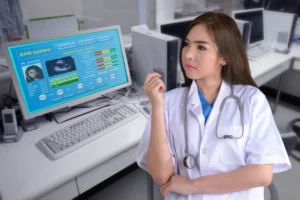
Virtual assistants work directly inside your EHR software. They know your platform, your templates, and also your workflows. They handle all the documentation and administrative tasks that your clinical team doesn’t have any time for.
Real-time documentation is the most obvious way they help you. A virtual medical scribe listens to the whole patient visit through a secure audio connection and builds the clinical note in the EHR while the appointment is occurring. All the history gets written down as the patient tells it to you. The exam findings get entered as the physician says them there. And the assessment and plan get documented accurately as well.
When the visit ends, the note is basically done. The physician just reviews and signs it. All done.
Beyond notes, virtual assistants also manage the EHR inbox. They sort patient portal messages. They route clinical questions to the right person too. They handle administrative communications, so nothing sits unread. They track referral orders placed inside the EHR until they are fully confirmed. They manage and follow up on prior authorization requests as well.
They also help with patient intake. They enter all demographic and insurance information, so the record is complete and ready before the patient comes.
Common Challenges with EHR Adoption
Globally, more than half of all EMR projects fail before they even reach their goal. You need to pay attention to this number. It shows what really happens when implementation doesn’t go well.
Inadequate training is the most common reason for this. A system that nobody knows how to use will not work well at all. No matter how good it is. Providers who had full role-specific training were more than twice as likely to use this system effectively. The training for this needs to be ongoing and fully updated when the system changes or when any problems occur.
Technical issues also affect adoption more than software companies like to admit. Slow systems, connection problems, and downtime all lead to workarounds that become habits. Once a team gets used to a workaround, changing that behavior takes too much effort.
Staff resistance is a normal reaction to change too. People who have built workflows around their current systems are now being asked to completely change how they work. Getting them involved early, including them in this setup and template design, and showing clear leadership support really helps reduce this kind of resistance.
Poor user satisfaction also consistently leads to low usage. The best EHR for a practice is not the one with the most features. It’s the one that people can navigate easily, and that fits how the practice actually works.
Making the Most of Your EHR System
The practices that get the most out of their EHR software have a few habits.
They train their people well and keep their training up to date. This means role-specific and practical training that reflects how the system is actually being used.
They use templates regularly too. Medical chart templates, patient notes templates, nursing report sheet templates, and SOAP note formats built for their most common visit types. These are used consistently across the whole team.
They keep the system customized to how they really work. Not every feature is turned on just because it’s there. Only the features and templates that match real clinical workflows and make documentation easier.
They also use dedicated virtual assistant support as the human layer that makes this system work well every day. Virtual assistants who document in real time, manage inbox tasks, handle referral and prior authorization workflows inside the EHR, and make sure all patient records are complete before every single visit.
Provma dedicated virtual assistants work inside your existing EHR software. They provide complete documentation, inbox management, referral coordination, prior authorization tracking, patient intake, and billing workflow support to your practice. All this within a fully HIPAA-compliant system. This means the EHR your practice already has starts working the way it should.
Conclusion
EHR software is the backbone of modern medical practice. And it’s not because it is technology. But because it’s the infrastructure that makes complete, accurate, and accessible clinical information fully possible. And that kind of information is what good patient care really needs.
But this infrastructure only delivers when the people using it are supported well. Virtual assistants are that support. With them, you get real-time documentation. Inbox management. Workflow coordination inside your own system. They are the human layer that turns a capable tool into something that really works.
Your EHR can work this well. With the right support, it already does.
FAQs
What is EHR software?
EHR software is a digital platform that stores all patient health information in an organized and searchable format. It is designed to be shared across many different healthcare providers and settings, giving a complete picture of every patient’s health history.
Why is EHR software important?
EHR software improves patient safety, reduces errors, supports clinical decisions, and also makes care delivery more efficient. It centralizes patient information, so all providers have access to the same complete record always.
What templates are used in EHR systems?
Common templates are medical chart templates, patient notes templates, nursing report sheets, and SOAP notes. SOAP stands for Subjective, Objective, Assessment, and Plan. It’s the standard format for clinical documentation.
How do virtual assistants help with EHR software?
Virtual assistants work inside your existing EHR to document all patient visits in real time, manage inbox tasks, handle referrals and prior authorizations, and support billing workflows. They help your team get the most out of your EHR.